Garbage disposal reset button: what to check
A garbage disposal reset button is a built-in overload safety feature that may trip when the disposal jams, overheats, or experiences excessive motor load. It can sometimes restore operation after the underlying problem has been addressed, but it is not a universal repair. Before pressing it, turn the wall switch off and make sure the disposal and surrounding electrical area are dry and free of obvious damage.
| What You Notice | What It May Mean | Safe First Check | What to Do Next |
|---|---|---|---|
| Disposal is completely silent | Reset or power issue | Switch off; check reset status | Briefly check power path if needed |
| Disposal hums but does not spin | Jam or mechanical problem | Turn it off immediately | Address the jam before resetting |
| Disposal stopped after running | Overload or overheating | Switch off and allow it to cool | Consider one controlled reset |
| Reset button will not stay in | Unresolved overload, jam, or fault | Do not keep pressing it | Stop and diagnose further |
| Breaker or GFCI trips again | Electrical or equipment problem | Leave disposal off | Get qualified help if repeated |
| Water is present under sink | Possible leak and electrical hazard | Do not touch wet electrical parts | Stop until the leak and electrical risk are addressed |
Check for Safety Problems Before Using the Garbage Disposal Reset Button
Before reaching under the sink, turn the disposal’s wall switch off.
Look carefully around the disposal, cord, plug, outlet, wiring, and cabinet floor. Do not press the reset button if water is near electrical components or if the disposal is actively leaking.
Also stop if you notice:
- A burning smell
- Sparking
- A hot switch
- Visible cord or wiring damage
- Water near the plug or outlet
- Water around the reset button
- Leakage from the bottom of the disposal
Never put your hand inside the disposal opening, even when the wall switch is off.
If you need to go beneath the sink for more than a visual check or use a manufacturer-approved disposal wrench, disconnect the disposal from power or turn off the correct breaker when it can be safely identified. Do not open electrical boxes, remove wiring covers, or attempt hardwired electrical repairs.
Where Is the Garbage Disposal Reset Button Located?
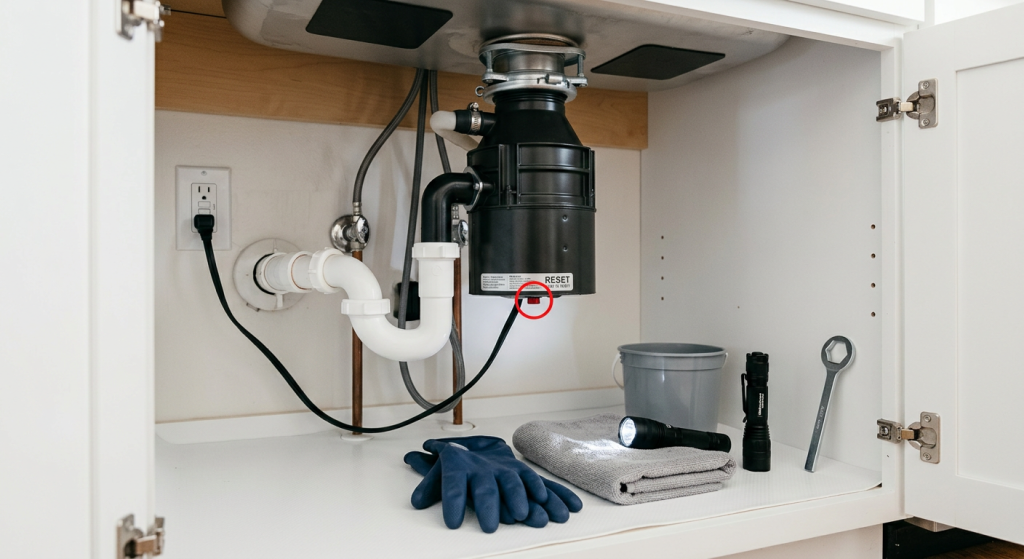
The garbage disposal reset button location varies by manufacturer and model, but it is commonly found on the bottom face or lower side of the disposal housing.
It is often a small red button, although the color and exact position can vary.
Turn the wall switch off before looking beneath the sink. Use a flashlight so you can identify the button without reaching around blindly.
If you cannot locate it, find the disposal’s model information and check the manufacturer’s instructions. Do not press unfamiliar buttons or remove covers in an attempt to find a reset.
The reset button should be accessible without opening the disposal’s electrical components.
What Does the Disposal Reset Button Do?
The reset button helps protect the disposal motor after an overload or overheating condition.
It may trip when:
- The disposal becomes jammed
- The motor load becomes excessive
- The motor overheats
- The unit stops during use because of an overload condition
Think of the button as a protective reset rather than a repair button.
If a jam caused the overload, resetting the disposal without addressing the jam does not solve the underlying problem. The same applies when an electrical or motor problem is causing repeated trips.
One controlled reset may help determine whether the disposal can return to normal operation. Repeatedly pressing the button should not be used to keep a malfunctioning disposal running.
When Is It Reasonable to Reset a Garbage Disposal?
A reset may be reasonable when the disposal suddenly stopped during normal use and there are no signs of an electrical or plumbing hazard.
Before proceeding, confirm that:
- The wall switch is off
- The area beneath the sink is dry
- No electrical damage is visible
- The disposal is not actively leaking
- There is no burning smell or sparking
- An obvious jam has been safely addressed
- An overheated disposal has had time to cool
Do not press the reset immediately after a disposal has overheated and stopped. Allow the unit to cool according to its manufacturer’s guidance before attempting a reset.
If the disposal was jammed, deal with that condition safely before resetting it. Do not use the reset button as a way to repeatedly energize a disposal that cannot turn.
How to Reset a Garbage Disposal Safely
Keep the reset process short. If the disposal does not return to normal operation after one controlled attempt, the next step is diagnosis rather than repeated resets.
Step 1: Turn the Wall Switch Off
Make sure the disposal switch is in the off position before reaching beneath the sink.
Do not rely on the switch alone if you will be using a tool on the disposal. Disconnect power or turn off the correctly identified breaker first.
Step 2: Make Sure the Area Is Dry and Safe
Inspect beneath the sink for leaks or standing water.
Do not continue if water is near the disposal’s electrical cord, plug, outlet, wiring, switch, or reset button.
Stop as well if you notice electrical damage, sparking, unusual heat, or a burning smell.
Step 3: Let an Overheated Disposal Cool
If the disposal stopped after extended or difficult operation and feels unusually hot, leave it off and allow it to cool.
Do not repeatedly test it while it is cooling.
Step 4: Address a Known Jam Before Resetting
If the disposal stopped because it jammed, do not press reset until the mechanical problem has been addressed safely.
Never put your hand inside the disposal. Do not force a disposal wrench or other tool against persistent resistance.
Step 5: Press the Reset Button Once
With the wall switch off and the area safe, press the reset button once.
A button that has tripped may move back into its normal position.
If it will not stay engaged or immediately pops back out, stop. Repeated pressing is not a repair.
Step 6: Make Sure Tools and Hands Are Clear
Before restoring power or testing the disposal, remove any tools and make sure everyone is clear of the sink opening and disposal.
Restore power only after the work area is safe.
Step 7: Run Cold Water
Turn on cold water at the sink before the brief test.
Step 8: Test the Disposal Briefly
Turn the disposal on only long enough to determine whether it operates normally.
If it runs normally, turn it off and continue to watch for unusual sounds, leaks, odors, or another trip.
Step 9: Stop Immediately if Something Is Wrong
Turn the disposal off immediately if it:
- Hums without spinning
- Trips the reset again
- Trips a breaker or GFCI
- Smells burnt
- Leaks
- Sparks
- Makes an abnormal mechanical sound
Do not continue cycling the switch or reset button.
If the Garbage Disposal Hums but Does Not Spin
A humming disposal is different from a completely silent one.
Humming generally means the unit is receiving power but the motor cannot turn normally. A jam or another mechanical problem may be preventing movement.
Turn the disposal off immediately.
Do not let it continue humming, repeatedly cycle the switch, or keep pressing reset. Continued attempts can overheat the motor and trip its overload protection.
Garbage Disposal Hums but Does Not Spin covers the appropriate troubleshooting path without treating the reset button as the solution.
If the Garbage Disposal Is Completely Silent
A completely silent disposal may have a different problem.
Possibilities include:
- A tripped disposal reset
- An unplugged disposal
- A tripped GFCI
- A tripped breaker
- A switch or other power problem
Keep these checks limited to accessible, normal homeowner controls. Do not open electrical boxes or remove wiring covers.
If the reset button does not restore operation, Garbage Disposal Won’t Turn On: Safe Checks First covers the broader no-power diagnostic sequence.
If a breaker or GFCI trips again after being reset, stop rather than repeatedly resetting it.
What if the Reset Button Will Not Stay In?
A garbage disposal reset button that immediately pops back out, refuses to stay engaged, or trips again after a brief test is telling you the underlying condition may still be present.
Possible causes include an unresolved jam, continued overload, motor problem, or electrical fault.
Do not keep pressing the button.
Likewise, do not repeatedly reset the breaker in an attempt to force the disposal to operate. A protective device that repeatedly trips deserves diagnosis.
Leave the disposal off until the reason for the repeated trip is identified.
Stop if the Disposal Is Leaking
Water and electrical equipment are a dangerous combination.
If the disposal is leaking from the bottom or water is present near its cord, plug, outlet, wiring, or reset button, do not press reset.
Do not energize the disposal to see whether it still works.
If you can safely shut off power without contacting wet equipment, leave the unit de-energized. Otherwise, keep clear of the wet electrical area and get qualified help.
A bottom leak can also indicate a disposal problem that a reset cannot correct.
Do Not Keep Resetting a Disposal That Trips
One controlled reset after a temporary overload can be a reasonable diagnostic step.
Repeated resets are different.
If the reset button trips again, the disposal hums, the breaker or GFCI trips, or the unit smells burnt, stop operating it.
The protective device may be responding to a condition that has not been corrected. Continuing to reset and test the disposal can increase the risk of equipment damage or an electrical hazard.
The goal is not to make the button stay in. It is to determine whether the disposal can operate normally and safely after the original problem has been addressed.
When to Call a Professional
Stop DIY troubleshooting when water is near electrical components, the disposal leaks from the bottom, or the cord, plug, outlet, switch, or visible wiring appears damaged.
Qualified help is also appropriate if the switch becomes hot, sparking occurs, a burning smell develops, or the breaker or GFCI repeatedly trips.
A disposal that continues humming, repeatedly trips its reset, or remains completely unresponsive after safe basic checks may have a mechanical, motor, or electrical problem that requires further diagnosis.
Do not open wiring compartments or attempt hardwired electrical repairs to investigate these symptoms.
Final Thoughts
The garbage disposal reset button can restore operation after some temporary overload or overheating conditions, but it is not a universal fix. Before pressing it, turn the switch off, make sure the area is dry, address any known jam safely, and allow an overheated unit to cool.
Press the reset only once before testing. If the disposal hums, trips again, leaks, smells burnt, or shows signs of an electrical problem, turn it off and stop troubleshooting rather than repeatedly resetting it.