
Motion Sensor Light Stays On: Settings, Sensors, and Safer Checks
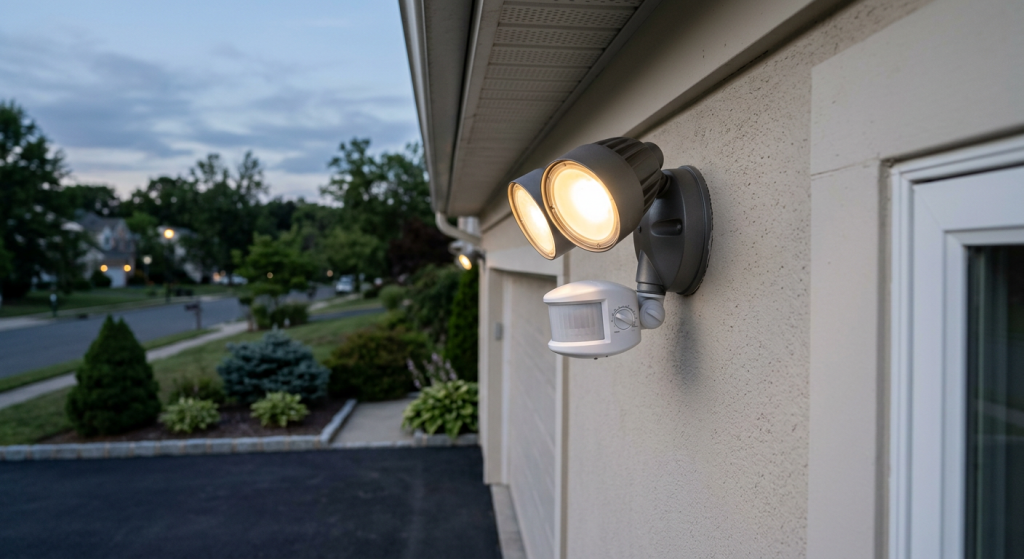
Motion sensor light stays on problems usually come from a setting, sensor aim, timer mode, nearby movement, weather exposure, bulb compatibility, or a failing fixture. The light may not be broken. It may be set to stay on longer than expected, stuck in manual mode, aimed at constant motion, or reacting to heat, reflections, pets, trees, or traffic.
Because this is an outdoor electrical fixture, start with safe checks only. Do not open the fixture housing, touch wiring, test live wires, remove the fixture, or work inside an electrical panel.
If the light feels hot, smells burned, buzzes, sparks, flickers heavily, shows discoloration, or has water inside the fixture area, stop using it and call a licensed electrician.
| Common cause | What you may notice | Safest next step |
|---|---|---|
| Manual or test mode | Light stays on all night or longer than expected | Check the switch and mode settings |
| Sensor aimed poorly | Light reacts to cars, trees, pets, or vents | Adjust sensor direction if safe |
| Timer or sensitivity setting | Light stays on too long after motion | Review settings and manual |
| Weather or fixture issue | Light acts up after rain, heat, or cold | Stop using it if damaged or wet |
Why a Motion Sensor Light Stays On
A motion sensor light is designed to turn on when it detects motion, then shut off after a set time. When it stays on, the cause is often simple. The fixture may be in manual override mode. The timer may be set too long. The sensitivity may be too high. The sensor may be aimed at something that keeps triggering it.
Outdoor lights can also react to things homeowners do not think about right away. Tree branches moving in the wind, cars passing by, pets crossing the yard, dryer vents, air conditioner units, shiny surfaces, and nearby heat sources can all confuse the sensor.
Some motion lights also include dusk-to-dawn settings. In that mode, the light may stay on after dark by design. Other fixtures have test modes that keep the light on or make it behave differently while you adjust the sensor.
The key is to treat the fixture as an electrical device first. Check safe outside causes, but do not open the housing or touch wiring.
Safe Checks to Try Before Assuming the Light Is Broken
Start with the wall switch. Many motion lights use a regular indoor switch to control power. If that switch was flipped in a certain pattern, the light may have entered manual override mode. Some fixtures stay on until the switch is turned off and back on after a short wait.
Next, look at the fixture from the ground during the day. Check whether the light is aimed at a busy area, a moving tree, a road, a sidewalk, a flag, or outdoor equipment. Also check whether anything is blocking the sensor, such as dirt, cobwebs, leaves, or a cover that has shifted.
Do not climb a ladder unless you can do so safely. If the fixture is high, damaged, wet, loose, or hard to reach, leave it alone.
Safe checks homeowners can make:
- Check whether the wall switch is on, off, or controlling manual mode
- Review the fixture manual for reset or mode instructions
- Look for dirt, leaves, spiderwebs, or debris on the sensor
- Notice whether the light points toward traffic, trees, pets, or vents
- Check whether the light has dusk-to-dawn or test mode enabled
- Stop if the fixture is wet, loose, cracked, hot, or discolored
If the light returns to normal after a setting change, the fixture may be fine. If it keeps staying on after basic checks, the sensor, bulb, fixture, or wiring may need closer evaluation.
Settings That Can Make a Motion Sensor Light Stay On
Many motion lights have several settings, and one wrong setting can make the fixture seem broken. The most common controls are sensitivity, timer, range, test mode, manual mode, and dusk-to-dawn mode.
Sensitivity controls how easily the sensor reacts. If it is set too high, the light may turn on for small movement far away. This can include branches, insects near the lens, cars at the edge of the driveway, or pets in the yard.
The timer controls how long the light stays on after motion stops. A timer set to 10 or 20 minutes can feel like the light is stuck on, especially if something keeps retriggering it before the timer ends.
Test mode is another common source of confusion. Some lights use test mode during setup so the sensor reacts quickly while you aim it. The light may not behave normally until test mode is turned off.
Dusk-to-dawn mode can also make the light stay on all night. That may be a feature, not a fault. Some fixtures combine motion and dusk-to-dawn options, so the label or manual matters.
Manual override mode often uses the wall switch. Depending on the fixture, quickly flipping the switch off and back on may force the light to stay on. The manual should explain how to return to automatic motion mode.
If you are comparing motion products before replacing anything, this guide on motion sensor light bulb vs motion sensor switch explains which option makes more sense for different rooms and fixtures.
Sensor Placement Problems That Trigger Constant Light
A motion sensor does not understand what you want it to ignore. It only reacts to what it detects. If the sensor points toward constant movement or changing heat, the light may stay on because it keeps seeing activity.
Cars are a common trigger. A light aimed toward the street, driveway, or neighbor’s driveway may turn on every time a vehicle passes. Sidewalks, gates, mailboxes, and shared walkways can create the same problem.
Plants can also cause trouble. Branches, tall grass, shrubs, hanging baskets, and flags can move in the wind. The movement may be enough to restart the timer again and again.
Heat sources matter too. Motion sensors often react to changes in heat. A dryer vent, furnace exhaust, grill, air conditioner, heat pump, or warm surface near the sensor may cause false triggers. Reflections from windows, cars, wet pavement, or shiny siding can add to the problem.
Placement clues to look for:
- The light points toward a road, sidewalk, or driveway
- Branches or shrubs move in front of the sensor
- Pets or wildlife pass through the detection area
- A vent, AC unit, grill, or heat source is nearby
- The fixture faces reflective glass, metal, or wet pavement
- The light turns on more often during wind, rain, or traffic
If the sensor can be aimed safely from the outside, small adjustments may help. Aim it lower or away from busy areas. Do not loosen the fixture, open the housing, or adjust anything that exposes wiring.
Bulb, Fixture, and Weather Issues to Consider
A motion sensor light may also stay on because of bulb compatibility, fixture age, water exposure, or sensor failure. This is especially common with older outdoor fixtures or fixtures exposed to heavy rain, sun, snow, or insects.
Bulb compatibility matters most when the fixture uses replaceable bulbs. Some older motion fixtures were designed before many LED bulbs became common. If an LED bulb behaves oddly, check the fixture manual or label for compatible bulb types. Some fixtures may require specific LED bulbs, dimmable bulbs, or a certain wattage range.
Do not use a bulb that exceeds the fixture’s rating. Also avoid using indoor bulbs in outdoor fixtures. Outdoor lights need bulbs and parts suited for the location and temperature.
Weather can affect the sensor lens, seals, and electronics. A dirty or fogged sensor may misread conditions. A cracked lens, broken gasket, loose cover, or water inside the fixture area can make the light unreliable and unsafe.
The fixture may also be reaching the end of its life. If it stays on no matter how the settings are changed, the sensor may have failed. Replacement may be the practical fix, but hardwired fixture replacement is not a beginner-safe repair for this article.
Beginner-safe product guidance stays simple: outdoor-rated fixtures, compatible bulbs, proper weather resistance, and clear manuals matter. Do not buy random replacement parts to solve a wiring problem.
If bulbs fail quickly or behave strangely in the same fixture, this guide on why a light bulb keeps burning out can help you compare bulb type, heat, fixture, and compatibility issues.
When to Stop Using the Light and Call an Electrician
Some motion sensor problems are just setting issues. Others need a licensed electrician. The difference comes down to warning signs, repeated failure, and whether the problem stays after safe checks.
Turn the light off at the wall switch if it is safe to do so and the fixture is acting unsafe. Do not keep using a light that smells hot, flickers badly, buzzes, sparks, or shows damage. Do not touch a wet fixture or any outdoor electrical part while standing on wet ground.
Call an electrician if you notice:
- Burning smell, smoke, sparks, buzzing, or crackling
- Heat, melted plastic, scorch marks, or discoloration
- Water inside the fixture, lens, cover, or wall area
- The light stays on after settings and aiming are checked
- More than one light, outlet, or switch is affected
- The fixture is loose, damaged, old, or unreliable
Also call if the motion light is hardwired and you think it needs replacement. A new fixture may solve the problem, but installing it involves wiring and safe mounting. That is not the same as changing a bulb.
When you call, describe the pattern. Mention whether the light stays on all night, comes on during wind or traffic, started after a bulb change, changed after a storm, or has any warning signs. That helps the electrician diagnose the issue faster.
Final Thoughts
When a motion sensor light stays on, the cause is often a setting, timer, sensitivity adjustment, manual mode, dusk-to-dawn mode, sensor aim, bulb mismatch, weather exposure, or a failing fixture.
Start with safe checks only. Review the manual, check the switch position, look for obvious triggers, clean only what you can reach safely, and confirm bulb compatibility at a basic level.
Do not open the fixture, touch wiring, replace hardwired parts, or work in the electrical panel. If the light shows heat, buzzing, sparks, burning smell, discoloration, moisture, repeated failure, or damage, stop using it and call a licensed electrician.