
How to Test a GFCI Outlet Safely
If you want to know how to test a GFCI outlet, the basic homeowner procedure is simple: make sure the receptacle has power, press TEST, confirm that power is interrupted, press RESET, and confirm that power returns. Stop if the GFCI does not trip, will not reset, immediately trips again, or shows heat, odor, sparks, buzzing, or visible damage.
| What happens | What it may mean | What to do |
|---|---|---|
| TEST trips the outlet normally | GFCI mechanism responded | Confirm power is interrupted |
| Power shuts off after TEST | Expected test result | Press RESET |
| RESET restores power | Normal reset behavior | Test is complete |
| TEST does nothing | No power, failed device, or another problem | Stop troubleshooting |
| RESET will not stay in | Fault, no incoming power, moisture, or failed GFCI | Do not force it |
| GFCI trips again immediately | Ongoing fault may be present | Leave it tripped |
| Outlet feels hot or smells burned | Possible electrical damage | Stop using it |
| Nearby outlets lose power | They may be protected downstream | Do not assume all nearby outlets are connected |
1. What a GFCI Outlet Does
A ground-fault circuit interrupter, or GFCI, monitors the current flowing through a circuit and is designed to interrupt power quickly when it detects an imbalance that may indicate current leaking along an unintended path.
That protection is especially important in areas where electricity and moisture may be present.
A GFCI does not prevent every electrical fault or every possible injury. Its job is specifically to respond to certain ground-fault conditions.
The built-in TEST button gives homeowners a simple way to check that the protective mechanism can trip.
2. Before You Test the GFCI
Before pressing any buttons, look at the receptacle from the outside.
Stop if you notice:
- Cracks
- Burned or scorched areas
- Melted plastic
- Moisture
- Exposed wiring
- A loose or damaged receptacle face
- Burning smell
- Buzzing
- Crackling
- Sparks
- Unusual heat
Do not remove the cover plate or pull the GFCI from the electrical box.
If there are visible or sensory warning signs, the problem is no longer a normal homeowner TEST/RESET check.
3. Confirm the GFCI Has Power
A GFCI generally needs incoming power for its TEST and RESET functions to behave normally.
A simple homeowner check may include plugging in a small lamp or another ordinary low-load device and confirming that it operates.
Some GFCI receptacles also have indicator lights, but those indicators vary by manufacturer and model. An illuminated light by itself should not be treated as proof that the protective function is working properly.
Follow the receptacle manufacturer’s instructions if they are available.
Avoid using high-load appliances just to test whether the outlet has power.
4. How to Test a GFCI Outlet
Step 1: Plug in a small test device if needed
Plug in a simple lamp or similar ordinary device so you can easily see whether the receptacle is supplying power.
Use only equipment that is in good condition.
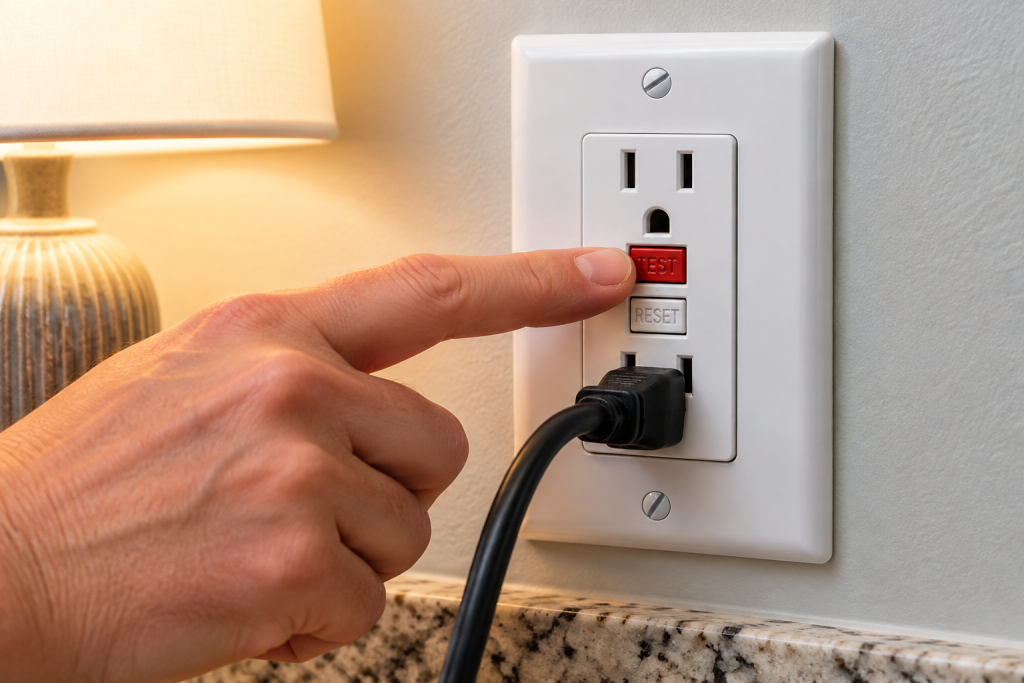
Step 2: Press the TEST button
Press the built-in TEST button firmly according to the receptacle’s instructions.
A normally functioning GFCI should trip.
You may hear or feel a click as the internal mechanism operates.
Step 3: Confirm power is interrupted
The test device plugged into the protected receptacle should turn off when the GFCI trips.
That loss of power is the key homeowner observation.
A GFCI may also protect additional receptacles downstream, so other outlets can lose power at the same time. However, do not assume every nearby receptacle is connected to that particular GFCI.
Step 4: Press RESET
Press the RESET button firmly.
Do not hold or force it repeatedly.
Step 5: Confirm power returns
If the GFCI resets normally, the small test device should operate again.
That completes the basic homeowner test.
Step 6: Stop if behavior is abnormal
Do not repeatedly cycle TEST and RESET if:
- TEST does nothing.
- RESET will not stay in.
- The GFCI trips again immediately.
- Power does not return.
- The receptacle develops heat, odor, noise, sparks, or visible damage.
5. What Should Happen During a Normal Test?
The expected sequence is straightforward:
Power on → TEST trips → power off → RESET → power restored
That is the normal homeowner observation when using the built-in test function.
If the sequence does not happen as expected, do not treat the GFCI as successfully tested.
There is no need to remove the device or inspect the wiring to understand that something is wrong.
6. What if the TEST Button Does Nothing?
If pressing TEST does not trip the GFCI, several broad possibilities exist.
They can include:
- No power reaching the receptacle
- A failed GFCI
- An internal mechanical problem
- A product-specific issue
- A wiring or installation problem
These causes cannot be reliably distinguished from the outside.
Do not remove the receptacle or attempt to diagnose its internal wiring.
If the built-in TEST function will not operate, the GFCI should not be treated as properly tested.
7. What if the RESET Button Will Not Stay In?
A RESET button that will not stay engaged can have several possible causes.
These may include:
- No incoming power
- A continuing ground-fault condition
- Moisture
- A downstream problem
- A failed GFCI
- A wiring or installation issue
Do not keep forcing the button or pressing it repeatedly.
If you are dealing with a GFCI outlet not resetting, keep the troubleshooting external and stop before any work that would require opening the box.
The inability to reset normally is itself useful information.
8. What if the GFCI Trips Again Immediately?
A GFCI that trips again may be responding to an ongoing problem.
Possible categories include:
- A connected appliance or device
- Moisture
- A downstream fault
- A wiring problem
- A failing GFCI
If a suspect plug-in device can be removed safely and there are no warning signs, one controlled reset may be reasonable.
If the GFCI immediately trips again, stop.
Do not keep resetting it in an attempt to make the outlet stay on.
The separate guide to a GFCI outlet keeps tripping covers repeated tripping in more detail.
9. What About Downstream Outlets?
One GFCI receptacle can sometimes protect additional receptacles farther along the same circuit.
When that GFCI trips, those downstream outlets may lose power too.
That is why a GFCI test can sometimes appear to shut off more than one receptacle.
Do not assume every outlet in the same room is downstream from the GFCI, however. Wiring layouts vary.
You do not need to identify line and load terminals or access the wiring to perform the normal built-in GFCI test.
If several outlets behave unexpectedly, professional diagnosis may be more appropriate.
10. Can You Use a Plug-In GFCI Tester?
A plug-in tester designed for GFCI testing may provide an additional check when used according to the tester manufacturer’s instructions.
However, it should not replace the receptacle’s built-in TEST button.
Plug-in tester results can also depend on the wiring configuration and the type of tester being used.
A plug-in device should not be treated as a complete electrical diagnosis, and it does not justify opening the receptacle or electrical box.
For routine homeowner testing, the built-in TEST and RESET buttons remain the primary method.
11. Can You Use a Non-Contact Voltage Tester?
A non-contact voltage tester is not the primary tool for checking whether the GFCI protection function works.
A non-contact tester may indicate the possible presence of AC voltage nearby, but it cannot confirm that the GFCI’s internal protective mechanism trips correctly.
It also cannot replace the built-in TEST sequence.
If your goal is to test the GFCI function, use the receptacle’s TEST button rather than trying to infer operation from a voltage detector.
12. How Often Should You Test a GFCI Outlet?
Follow the GFCI manufacturer’s instructions for testing frequency.
Many manufacturers provide periodic testing guidance, and monthly testing is commonly recommended on many devices.
However, the instructions supplied with the specific GFCI should be followed.
The important point is to test the protective function periodically rather than assuming that a receptacle is operating correctly simply because it still supplies power.
13. Common Testing Mistakes
Common mistakes include:
- Pressing RESET without first using TEST
- Assuming an indicator light alone proves the GFCI works
- Repeatedly resetting a GFCI that keeps tripping
- Testing a visibly damaged or overheated receptacle
- Removing the cover plate to investigate
- Assuming all nearby outlets are protected by the same GFCI
- Treating a plug-in tester as a complete diagnosis
- Assuming a GFCI is fine because it still supplies power
A successful test is about the sequence: the GFCI should trip when TEST is pressed, interrupt power, and then reset normally.
14. When to Stop and Call an Electrician
Professional help is appropriate when:
- TEST does nothing.
- RESET will not stay in.
- The GFCI repeatedly trips.
- Power does not return normally.
- The receptacle becomes hot.
- A burning smell appears.
- Buzzing or crackling occurs.
- Visible damage is present.
- Moisture is involved.
- Sparks occur.
- Multiple outlets behave abnormally.
- Further diagnosis would require opening the electrical box.
Do not remove the GFCI, probe live terminals, identify internal wiring, or open the electrical panel to continue troubleshooting.
Final Thoughts
Knowing how to test a GFCI outlet safely comes down to using the built-in TEST and RESET functions as intended. Confirm that the receptacle has power, press TEST, verify that power is interrupted, press RESET, and confirm that power returns.
If the GFCI will not trip, will not reset, immediately trips again, or shows heat, odor, sparks, noise, moisture, or visible damage, stop troubleshooting. The normal homeowner test is external and simple; anything beyond that belongs in professional electrical diagnosis.